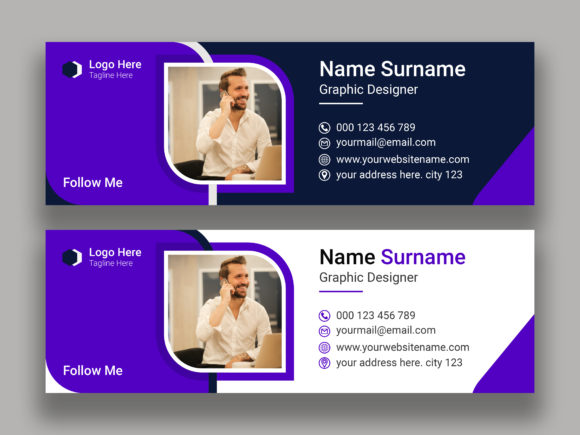
Mastering Email Signature Design for Brand Impact
In the fast-paced world of digital marketing, every pixel counts. While much attention is paid to website layouts and social media graphics, one critical touchpoint often gets overlooked: the email signature. It is the digital equivalent of a handshake, a business card, and a brand manifesto all rolled into one compact interface. Effective Email Signature Design transforms this mundane footer into a powerful tool for business communication. It is not merely about listing contact information; it is about creating a cohesive personal information interface that reinforces your professional identity with every message you send.
When we discuss design assets in this context, we are referring to more than just text. We are talking about structured layers, balanced white space, and strategic use of color. A well-crafted signature serves as a constant reminder of your brand identity, ensuring consistency across all electronic mail correspondence. Whether you are an entrepreneur, a marketer, or a creative professional, understanding the nuances of this design element can significantly elevate your perceived professionalism and audience engagement.
The Visual Language of Professional Correspondence
The appeal of a high-quality email signature lies in its clarity and aesthetic balance. Unlike a flashy display font used for a poster, the typography here must prioritize readability while maintaining character. The visual characteristics should reflect the personality of the sender. For a corporate lawyer, the style might be minimal, utilizing a clean sans serif font to convey stability and trust. For a graphic designer or a boutique craft seller, the design might incorporate a subtle script font or a handwritten font to add a layer of warmth and creativity.
Modern typography in email signatures relies heavily on hierarchy. Your name should stand out, followed by your title, and then the contact details. This structure guides the reader’s eye naturally. When working with templates, such as those provided in Ai and Eps cs6 Version formats, you gain the flexibility to manipulate these elements precisely. These vector-based files allow for infinite scalability without loss of quality, ensuring that your logo and icons remain crisp on both retina displays and standard monitors.
The overall appeal comes from the harmony between text and graphical elements. A cluttered signature distracts from the message, while a sparse one may feel impersonal. The goal is to strike a balance where the design supports the content rather than overpowering it. This is where the concept of layer organization becomes crucial. A well-organized file structure allows designers to toggle visibility, adjust spacing, and swap colors efficiently, making the customization process smooth and error-free.
Strategic Applications Across Digital Platforms
While primarily used in electronic mail, the principles of email signature design extend far beyond the inbox. The components created for your signature can be repurposed for various other branding needs. The same logo placement and color schemes can inform your social media graphics, ensuring a unified look across LinkedIn, Twitter, and Instagram. This consistency strengthens brand recognition, making your visual identity instantly recognizable regardless of the platform.
For publishers and content creators, the typography choices made in email signatures often mirror those used in editorial design. If you use a specific serif font for your blog headers, incorporating a complementary typeface in your signature creates a seamless transition between your content and your correspondence. This attention to detail signals to your audience that you value coherence and quality in all aspects of your work.
In the realm of packaging design and print materials, the clean lines and structured layout of a professional signature can inspire label designs or business cards. The 100 Editable RGB Color Mode feature found in premium design templates ensures that the colors you see on screen are vibrant and accurate. While RGB is ideal for digital screens, having control over these values makes it easier to convert them to CMYK for print projects, maintaining brand integrity across physical and digital mediums.
Moreover, small business owners can leverage these design assets for local marketing. A well-designed signature can include links to recent promotions, upcoming events, or portfolio pieces. This turns every email into a mini-marketing campaign, driving traffic to your website or online store without feeling intrusive. It is a subtle yet effective way to keep your audience engaged with your latest offerings.
Practical Guidance for Implementation and Customization
Choosing the right design for your email signature requires a thoughtful approach. Start by evaluating your project fit. Are you aiming for a corporate look or a creative vibe? This decision will dictate your choice of typeface. If you are unsure, a neutral sans serif font is always a safe bet for professionalism. However, if you want to inject personality, consider pairing it with a creative font for your name or tagline. Remember, font pairing is an art; ensure that the styles complement rather than clash with each other.
Readability considerations are paramount. Avoid using overly decorative scripts for essential contact information. The primary goal is communication, so ensure that phone numbers and email addresses are easy to read at a glance. Test your signature across different email clients like Outlook, Gmail, and Apple Mail. Rendering issues can occur, so keeping the design simple and using web-safe fonts or embedded images wisely is key.
When working with files like the Eps cs6 Version, take advantage of the layer organization. Isolate elements such as icons, text blocks, and logos. This makes it easier to update information without disrupting the overall layout. Since image files are not included in many template packages, you will need to source high-resolution versions of your own logo and headshot. Ensure these images are optimized for web use to keep email load times fast.
Commercial licensing is another critical aspect. If you are using a premium font or specific design assets, verify that your license covers commercial use, especially if you are designing for clients. Many free fonts have restrictions, so investing in a proper commercial font license can save you from legal headaches down the line. It also supports the type designers who create these beautiful tools.
Finally, keep your signature updated. As your role changes or your business evolves, so should your signature. Regularly review the links to ensure they are active and relevant. A broken link or outdated title can undermine the professionalism you worked hard to establish. By treating your email signature as a dynamic part of your brand identity, you ensure it continues to serve its purpose effectively.
In conclusion, Email Signature Design is a small but mighty component of your digital presence. It offers a unique opportunity to reinforce your brand identity, showcase your professionalism, and facilitate better business communication. By paying attention to visual hierarchy, typography, and consistency, you can create a signature that not only looks great but also works hard for you. Whether you are a solo entrepreneur or part of a large team, investing time in this detail yields long-term benefits in how you are perceived by clients, partners, and colleagues.