Mastering Visual Appeal with a Food Social Media Instagram Post Template
In the digital age, where attention spans are measured in seconds, the visual presentation of culinary content can make or break engagement. For restaurants, food bloggers, and home cooks alike, maintaining a consistent and aesthetically pleasing presence on social media is no longer optional—it is essential. This is where a professionally designed Food Social Media Instagram Post template becomes an invaluable asset. By leveraging pre-structured designs, creators can focus less on technical layout issues and more on the storytelling aspect of their cuisine.
The demand for high-quality visual content has surged, driven by platforms that prioritize imagery over text. A well-crafted post does more than display a dish; it evokes emotion, stimulates appetite, and encourages interaction. However, creating these visuals from scratch requires time, design expertise, and software proficiency. Using a structured template simplifies this process, offering a bridge between professional design standards and everyday usability.
Understanding the Structure and Utility
A Food Social Media Instagram Post template is not merely a static image; it is a dynamic framework designed to streamline content creation. Typically built using industry-standard software like Adobe Photoshop, these templates provide a foundational layout that users can customize to fit their specific branding needs. The core value lies in its organization. When a file is described as "well organized and structured," it means that every element—from background colors to text boxes—is logically arranged.
For instance, layers are often grouped by name, allowing users to toggle visibility, adjust opacity, or modify specific components without affecting the entire composition. This level of organization is crucial for efficiency. Imagine needing to change the background color to match a seasonal promotion. In a disorganized file, this might require hunting through dozens of unnamed layers. In a properly structured template, it is a matter of seconds.
The Role of Smart Objects in Workflow Efficiency
One of the most significant features of modern design templates is the use of Smart Objects. In the context of a food photography post, a Smart Object acts as a container for your images. Instead of manually resizing, cropping, or distorting a photo to fit a designated space, you simply double-click the Smart Object layer, paste your image, and save. The template automatically adjusts the image to fit the predefined dimensions while preserving its aspect ratio and quality.
This functionality is particularly beneficial for those who may not have advanced graphic design skills. It removes the guesswork from composition, ensuring that every post maintains a professional look. Whether you are showcasing a vibrant salad, a decadent dessert, or a steaming bowl of soup, the Smart Object ensures that the focal point remains clear and visually appealing.
Key Features That Enhance Creativity
When evaluating a template for your culinary content, several key features contribute to its overall effectiveness and ease of use. Understanding these elements helps in selecting the right tool for your specific needs.
- Easy to Edit: The primary goal of any template is to reduce friction in the creation process. An editable template allows for quick changes to text, colors, and images, enabling rapid response to trending topics or daily specials.
- Fully Layered and Organized: As mentioned, logical layer grouping is essential. It ensures that users can isolate specific elements, such as typography or decorative graphics, without disrupting the underlying structure.
- Free Fonts Included: Typography plays a critical role in setting the tone of a post. Templates that include links to free fonts ensure that the design looks exactly as intended without requiring additional purchases or subscriptions.
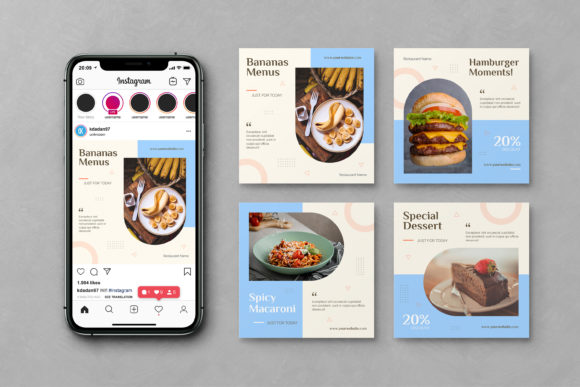
- High-Resolution Standards: Most professional templates are set to 1080x1080 pixels at 72 DPI in RGB color mode. These specifications are optimized for digital screens, ensuring crisp visuals on mobile devices where most social media consumption occurs.
These features collectively empower users to produce consistent, high-quality content. Consistency is key in building a recognizable brand identity. When followers see a cohesive visual style across your feed, it reinforces brand recall and trust.
Who Benefits from Using These Templates?
The versatility of a Food Social Media Instagram Post template means it serves a wide range of users. From individual creators to established businesses, the applications are diverse.
- Restaurant Owners and Marketers: For eateries, social media is a direct line to customers. Templates allow marketing teams to quickly create posts for new menu items, happy hour specials, or holiday promotions. The ability to update content rapidly ensures that the restaurant’s online presence remains current and engaging.
- Food Bloggers and Influencers: Content creators often need to produce a high volume of posts to maintain audience engagement. Templates reduce the time spent on design, allowing bloggers to focus on recipe development, photography, and writing captions.
- Home Cooks and Hobbyists: Even amateur cooks sharing their culinary journeys can benefit from structured designs. A polished post can help grow a personal brand or community around a specific dietary niche, such as veganism or gluten-free baking.
- Graphic Designers: Professionals can use these templates as a starting point for client projects, saving billable hours on initial layout construction. This allows designers to allocate more time to customizations and strategic branding elements.
Practical Applications and Real-World Scenarios
To fully appreciate the value of these templates, consider real-world scenarios where they enhance communication and engagement.
Scenario 1: Launching a Seasonal Menu
A café wants to introduce its autumn menu featuring pumpkin spice lattes and apple crumble. Using a template, the manager can quickly swap out summer-themed images for warm, autumnal colors. The text layers are updated to highlight the new items, and the Smart Objects are filled with high-quality photos of the dishes. Within minutes, a cohesive series of posts is ready for scheduling, ensuring a timely and professional launch.
Scenario 2: Promoting a Limited-Time Offer
A food truck operates on tight schedules and needs to announce daily locations and specials. A template with predefined spaces for text and images allows the owner to update the location and menu item each morning. The consistent layout helps regular customers quickly identify important information, such as the day’s special or the truck’s location, amidst the noise of their social media feeds.
Scenario 3: Educational Content for Nutritionists
A nutritionist sharing tips on healthy eating can use a template to create infographics. By placing icons, short text blocks, and illustrative images into the structured layout, complex information becomes digestible and shareable. The visual consistency helps establish the nutritionist as an authority in the field.
Considerations and Limitations
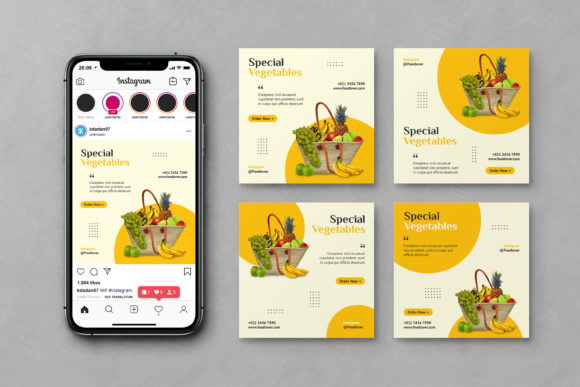
While templates offer numerous advantages, it is important to approach them with realistic expectations. First, it is crucial to note that this is not a mockup. The images seen in previews are for demonstration purposes only and are not included in the main file. Users must provide their own high-quality photography to achieve the desired result. A template cannot compensate for poor lighting or low-resolution images.
Additionally, while templates are designed to be flexible, they do have limitations. Deviating significantly from the original layout may require advanced design skills. For example, moving major structural elements or changing the aspect ratio could disrupt the balance of the design. Users should view the template as a guide rather than a rigid constraint, but also recognize that substantial alterations may negate the time-saving benefits.
Another consideration is font licensing. Although many templates include links to free fonts, users must ensure they comply with the licensing agreements for commercial use. Always verify the terms before using fonts in branded materials for business purposes.
Evaluating Suitability for Your Needs
When deciding whether a Food Social Media Instagram Post template is right for your project, consider your current workflow and resources. If you find yourself spending excessive time on layout decisions or struggling with software tools, a template is likely a worthwhile investment. It provides a professional foundation that elevates the perceived quality of your content.
However, if your brand relies heavily on unique, avant-garde designs that defy standard layouts, a template might feel restrictive. In such cases, custom design work may be more appropriate. For most users, though, the balance of structure and flexibility offered by these templates provides an optimal solution for consistent, high-quality social media presence.
Conclusion
In conclusion, a well-organized Food Social Media Instagram Post template is more than just a design file; it is a strategic tool for effective digital communication. By simplifying the technical aspects of content creation, it empowers users to focus on what truly matters: sharing delicious, engaging, and authentic food stories. Whether you are a seasoned marketer or a passionate home cook, leveraging these resources can enhance your visual narrative and connect you more deeply with your audience. Embrace the efficiency, clarity, and professionalism that structured design brings to your culinary journey.