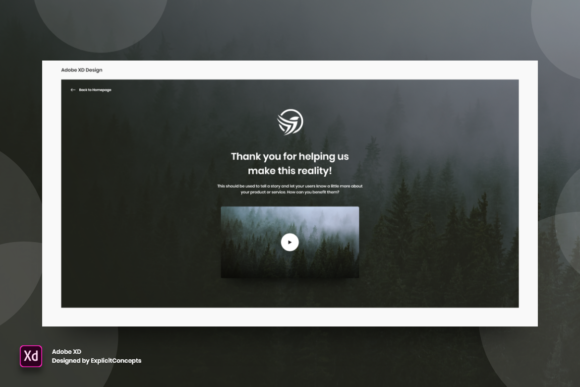
Streamlining Post-Conversion Design with a Thank You Page Template in Adobe XD
In the lifecycle of digital product design, the moment immediately following a user action is often treated as an afterthought. Whether that action is a newsletter signup, a completed purchase, or a downloaded whitepaper, the destination screen serves a critical functional and psychological role. This is where a dedicated Thank You Page - Adobe XD asset becomes indispensable for modern designers. It is not merely a static image; it is a structured, editable component designed to integrate seamlessly into broader user experience workflows. By utilizing a pre-built, well-organized template, designers can ensure consistency, reduce production time, and maintain high visual standards without reinventing the wheel for every new project.
The Strategic Role of the Confirmation Screen
Before diving into the technical specifics of the file structure, it is essential to understand where this asset fits within a larger design ecosystem. A thank you page is the final step in a conversion funnel. It confirms success, reduces user anxiety, and often provides the next logical step in the customer journey. For marketers and entrepreneurs, this page is prime real estate for secondary calls to action, such as social sharing buttons or related product recommendations. For educators and publishers, it might deliver immediate access to learning materials.
When working in Adobe XD, having a ready-to-use template allows teams to focus on strategy rather than layout mechanics. Instead of spending hours aligning vectors and choosing typography for a transient screen, designers can deploy a high-quality base and customize it to match brand guidelines. This shift from creation to adaptation significantly accelerates the prototyping phase, allowing for faster iteration and user testing.
Organization and Layer Management for Efficiency
The primary value proposition of a professional-grade Thank You Page - Adobe XD file lies in its internal organization. A chaotic file structure can hinder collaboration and slow down edits, especially when handing off designs to developers or other team members. This template addresses those pain points through a rigorous approach to layer management.
- Clear Naming Conventions: Every element, from background shapes to text blocks, is named logically. This eliminates the guesswork when searching for specific components within the layers panel.
- Logical Grouping: Related elements are grouped together. For instance, the main headline, subtext, and primary button are contained within a single group or component, making it easy to move the entire content block without breaking alignment.
- Layer Hierarchy: The stacking order reflects the visual hierarchy, ensuring that interactive elements sit correctly above background assets.
This level of organization supports long-term usability. As brands evolve, designers may need to revisit old projects to update messaging or visuals. A well-structured file ensures that these updates are straightforward, preserving the integrity of the original design while allowing for necessary changes.
Editability and Customization Workflow
Flexibility is crucial in design tools. No two brands share the exact same voice, color palette, or typographic preferences. Therefore, the Thank You Page - Adobe XD template is built to be fully editable. The process of customization is intuitive, catering to both novice users and experienced professionals.
Text elements are unlocked and ready for modification. You can instantly change the headline from "Thank You for Your Purchase" to "Welcome to the Community" or any other message that suits your specific campaign. Fonts are easily swappable, allowing you to apply your brand’s typeface with a few clicks. Similarly, colors are not baked into rasterized images; they are vector-based or style-linked, meaning you can update the primary brand color across the entire page by adjusting a single style definition if linked styles are used, or by selecting individual shapes.
Moving or removing elements is equally seamless. If your workflow does not require a social media sharing section, you can simply delete that group without leaving behind empty gaps or misaligned artifacts. The responsive nature of the layout ensures that remaining elements can be adjusted quickly to maintain visual balance.
Technical Specifications and Quality Control
While Adobe XD is primarily a vector-based UI/UX design tool, the output quality matters when assets are exported for development or presentation. This template is crafted at 72 dpi, the standard resolution for web and screen display. This ensures that the file remains lightweight and performant while delivering crisp, clear visuals on all devices.
The format is native Adobe XD, ensuring compatibility with the latest versions of the software. This native format preserves all interactive states, component properties, and vector editability. It avoids the pitfalls of converting files from other formats, which often result in lost layers or flattened images that are difficult to modify. By sticking to the native format, the template ensures that all features of Adobe XD, such as repeat grids and auto-animate, remain accessible if the designer chooses to enhance the prototype further.
Integrating the Template into Real-World Workflows
Understanding how to integrate this asset into your daily routine maximizes its value. Here are practical scenarios where this template proves useful:
1. Rapid Prototyping for Client Presentations
When pitching a new website or app concept to clients, showing a complete user flow—including the post-conversion experience—adds credibility. Instead of presenting a broken link or a placeholder screen, you can drop in the Thank You Page - Adobe XD template, customize the branding in minutes, and demonstrate a polished end-to-end experience. This attention to detail often influences client confidence and approval rates.
2. A/B Testing Variations
Marketers and product managers often need to test different messages or layouts to optimize conversion rates. With a well-organized template, creating variations is efficient. You can duplicate the artboard, change the headline on one version, and alter the button color on another. This speed allows for rapid experimentation and data-driven decision-making without significant design overhead.
3. Consistent Brand Implementation Across Teams
For agencies or in-house teams managing multiple products, maintaining visual consistency is challenging. Using a standardized template ensures that all thank you pages adhere to the same structural principles. Designers can focus on adapting the content while relying on the template for spacing, alignment, and hierarchy. This reduces the cognitive load on designers and ensures a uniform user experience across different touchpoints.
Preparation and Best Practices for Use
To get the most out of this resource, preparation is key. Before opening the file, gather your brand assets: hex codes for colors, font files, and any specific imagery or logos you intend to use. Having these ready streamlines the customization process.
Additionally, consider the context of the thank you page within the broader user journey. Does the user need immediate access to a download? Should they be directed to a support forum? Plan these functional requirements before editing the template. This foresight allows you to add or remove sections logically, ensuring the final design serves its intended purpose effectively.
It is also advisable to review the layer structure upon first opening the file. Familiarize yourself with the grouping logic. This initial investment of time pays dividends during the editing phase, as you will know exactly where to find each element. If your team uses design systems, consider converting the template’s components into your library symbols to enforce consistency across future projects.
Long-Term Value and Scalability
The true measure of a design asset is its longevity. A Thank You Page - Adobe XD template is not a one-time use item. It is a foundational block that can be adapted for countless campaigns, products, and services. As your business grows and your design needs evolve, this template scales with you. Its clean structure allows for easy updates, ensuring that your post-conversion experiences remain fresh and aligned with current design trends.
Moreover, the ease of use encourages non-designers, such as content creators or marketers with basic XD skills, to make minor textual updates without needing constant designer intervention. This democratization of design tasks frees up professional designers to focus on more complex challenges, improving overall team productivity.
In conclusion, integrating a high-quality, well-organized Thank You Page - Adobe XD template into your workflow is a strategic move. It bridges the gap between aesthetic quality and operational efficiency. By leveraging a resource that is fully editable, clearly layered, and ready to use, you ensure that every user interaction ends on a high note, reinforcing brand trust and driving further engagement. Whether you are a freelancer managing multiple clients or part of a large enterprise team, this tool simplifies the design process, allowing you to deliver professional results with minimal friction.