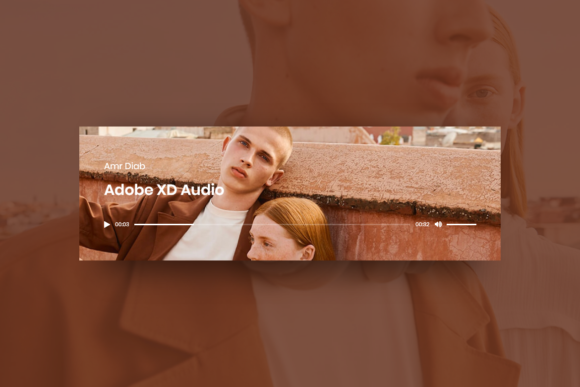
Streamlining UI Design with the Audio Player Widget for Adobe XD
In the fast-paced world of digital product design, efficiency is not just a preference; it is a necessity. Whether you are designing a podcast platform, a music streaming service, or an educational course interface, audio elements are becoming increasingly central to user experience. However, building these components from scratch can consume valuable time that could be better spent on high-level interaction design and user flow optimization. This is where specialized assets like the Audio Player Widget - Adobe XD come into play. It serves as a practical resource for designers who need to prototype functional, aesthetically pleasing audio interfaces without reinventing the wheel.
The Value of Pre-Built UI Components
For professionals ranging from freelance UI designers to in-house teams at startups, the pressure to deliver high-fidelity prototypes quickly is constant. Creating a robust audio player involves more than just drawing a rectangle and adding a play button. It requires consideration of progress bars, volume controls, track information display, and various states such as playing, paused, or buffering. The Audio Player Widget - Adobe XD addresses this complexity by providing a pre-structured foundation. By utilizing a well-organized asset, designers can bypass the initial setup phase and move directly into customization and integration within their broader design systems.
The primary appeal of this widget lies in its organization. A common frustration with downloaded UI kits is messy layer structures, where groups are unnamed, and elements are locked or hidden in obscure folders. In contrast, this widget emphasizes a clean hierarchy. Every element is placed in clearly named layers, which significantly reduces the cognitive load when editing. For a designer working under a tight deadline, the ability to instantly locate the "Play Button" or "Progress Bar" layer without hunting through a chaotic panel is a substantial productivity boost.
Key Features and Usability Analysis
When evaluating any design asset, usability and flexibility are paramount. The Audio Player Widget - Adobe XD is built with these principles in mind, offering a balance between structure and creative freedom. Here is a breakdown of its core characteristics and how they translate to real-world workflow benefits:
- Fully Editable Structure: The widget is not a static image. Every component, from the background container to the smallest icon, is vector-based and fully editable. This allows designers to adjust dimensions, reshape corners, or completely alter the layout to match specific brand guidelines.
- Customizable Typography and Colors: Text fields are live, meaning you can change track titles, artist names, or timestamps directly. Fonts and colors are easily adjustable, ensuring seamless integration with existing design systems. This flexibility is crucial for maintaining consistency across a multi-screen prototype.
- High-Quality Resolution: Rendered at 72 dpi, the asset is optimized for screen display, which is the standard for web and mobile interface design. The vectors ensure that the widget remains crisp regardless of scaling, preventing pixelation on high-density displays.
- Modular Element Management: Users can easily move, hide, or remove elements. If a project requires a minimalist player without volume controls, those layers can be deleted or hidden without breaking the rest of the component. This modularity supports rapid iteration during the design process.
The format is native to Adobe XD, which ensures compatibility and performance within the ecosystem. For teams already standardized on Adobe Creative Cloud, this eliminates the friction of converting files from other formats like Sketch or Figma, preserving styles and effects accurately.
Practical Applications in Real-World Projects
The utility of the Audio Player Widget - Adobe XD extends beyond simple music apps. Its versatility makes it suitable for a wide array of digital products. Consider an e-learning platform where audio lectures are a primary content format. A designer can use this widget to create a consistent playback interface for course modules, ensuring that students have a familiar and intuitive control scheme across different lessons. Similarly, podcasters launching a companion website can use this asset to prototype their episode pages, focusing on content placement rather than UI mechanics.
For marketers and bloggers who manage their own content presentation, having a ready-to-use template allows for quicker visualization of new features. Instead of describing an audio feature in text, they can present a visual prototype to stakeholders or developers, reducing miscommunication and accelerating the approval process. The ease of editing texts and fonts means that non-designers with basic XD knowledge can also make minor adjustments, such as updating episode titles or changing accent colors to match seasonal campaigns.
Enhancing Workflow Efficiency
Time saved on component creation is time invested in user testing and refinement. By starting with a solid base, designers can conduct A/B tests on different player layouts more rapidly. For instance, one might test a compact player versus an expanded view with album art. With a well-organized file, duplicating and modifying these variations takes minutes rather than hours. This agility is particularly valuable for agencies handling multiple clients, where each project may have distinct visual requirements but similar functional needs.
Who Benefits Most from This Asset?
While any UI/UX designer can benefit from pre-made components, certain groups will find the Audio Player Widget - Adobe XD particularly advantageous:
- Freelancers and Solo Practitioners: Individuals managing all aspects of a project, from design to client communication, need tools that maximize output per hour. This widget reduces billable hours spent on repetitive UI tasks.
- Small Business Owners and Entrepreneurs: Those building MVPs (Minimum Viable Products) often lack extensive design resources. A ready-to-use, high-quality widget allows them to create professional-looking prototypes for investor pitches or user feedback sessions without hiring a dedicated design team.
- Educators and Course Creators: As online education grows, the need for clean, functional audio interfaces increases. Educators can use this to map out student experiences, ensuring that technical barriers do not hinder learning.
- Marketing Teams: When launching audio-centric campaigns, such as branded podcasts or audio ads, marketing teams can use this widget to visualize how these elements will appear on landing pages or social media previews.
Considerations and Limitations
It is important to approach any pre-built asset with a critical eye. While the Audio Player Widget - Adobe XD offers significant advantages, it is a starting point, not a final solution. Designers must ensure that the default styling aligns with their project’s accessibility standards. For example, contrast ratios between text and background colors should be checked and adjusted if necessary to meet WCAG guidelines. Additionally, while the widget provides the visual interface, it does not include the underlying code or interactive logic for development. Handoff to developers will still require clear specifications regarding behavior, such as how the progress bar responds to user input or how the player handles network errors.
Furthermore, reliance on pre-made widgets should not stifle innovation. Designers should feel empowered to deconstruct the widget, combining elements in novel ways or using it as a reference for building custom components that better serve unique user needs. The goal is to leverage efficiency without sacrificing originality or user-centric design principles.
Final Thoughts on Long-Term Value
In the context of a professional design toolkit, the Audio Player Widget - Adobe XD represents a smart investment in workflow optimization. Its strength lies not just in its visual quality, but in its structural integrity and ease of customization. By providing a well-organized, fully editable foundation, it allows designers to focus on what truly matters: creating engaging, user-friendly experiences. For anyone involved in digital product creation, from seasoned professionals to serious hobbyists, integrating such reliable resources can lead to more consistent outputs and a more streamlined design process. Ultimately, the value of this asset is measured by the time it saves and the clarity it brings to the prototyping phase, making it a worthy addition to any Adobe XD user’s library.